
€9.99*
Transform your Shopware 6 email communications into professionally compliant messages with the DigitalVerve Email Footer Management plugin. This enterprise-grade solution automatically injects comprehensive legal information, company data, and contact details into every outgoing email from your shop, ensuring consistent brand presentation and legal compliance across all customer communications.
Universal Email Footer Injection System
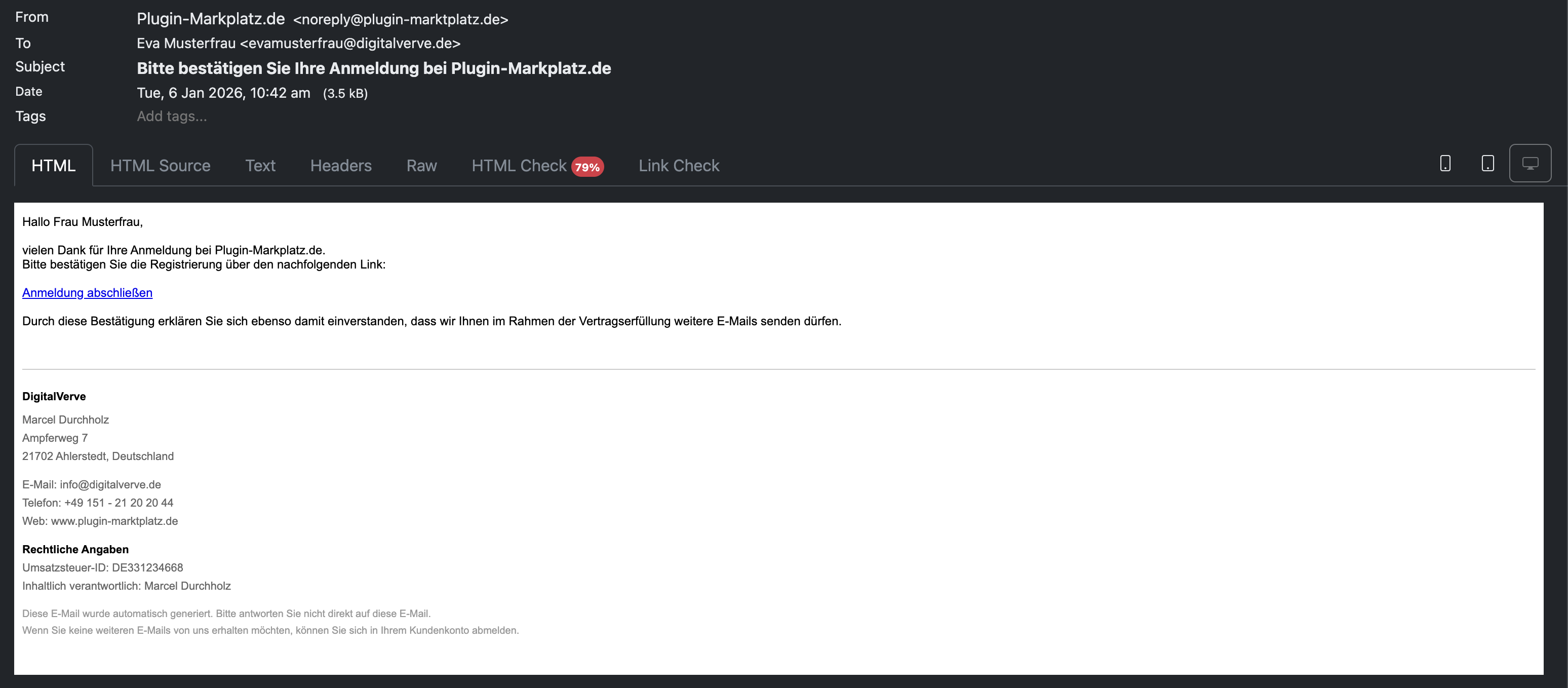
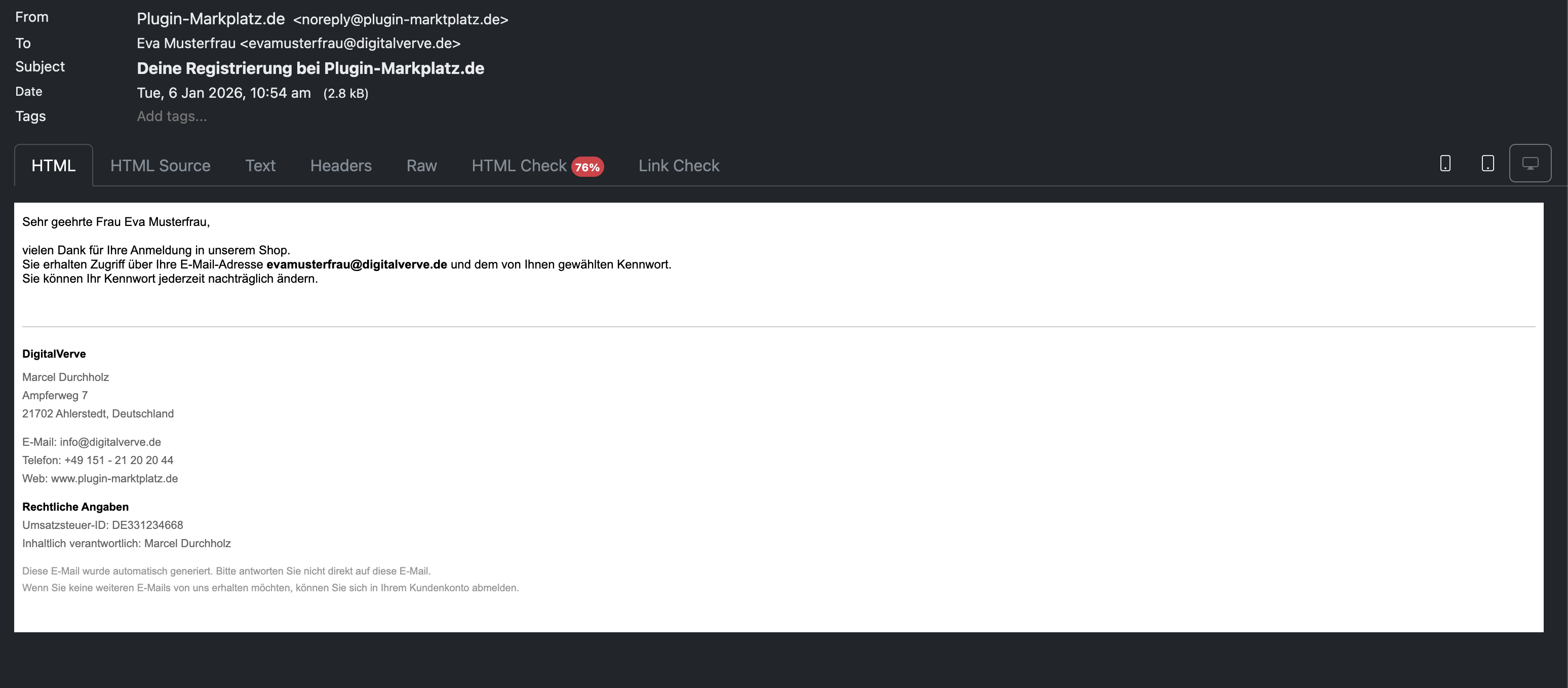
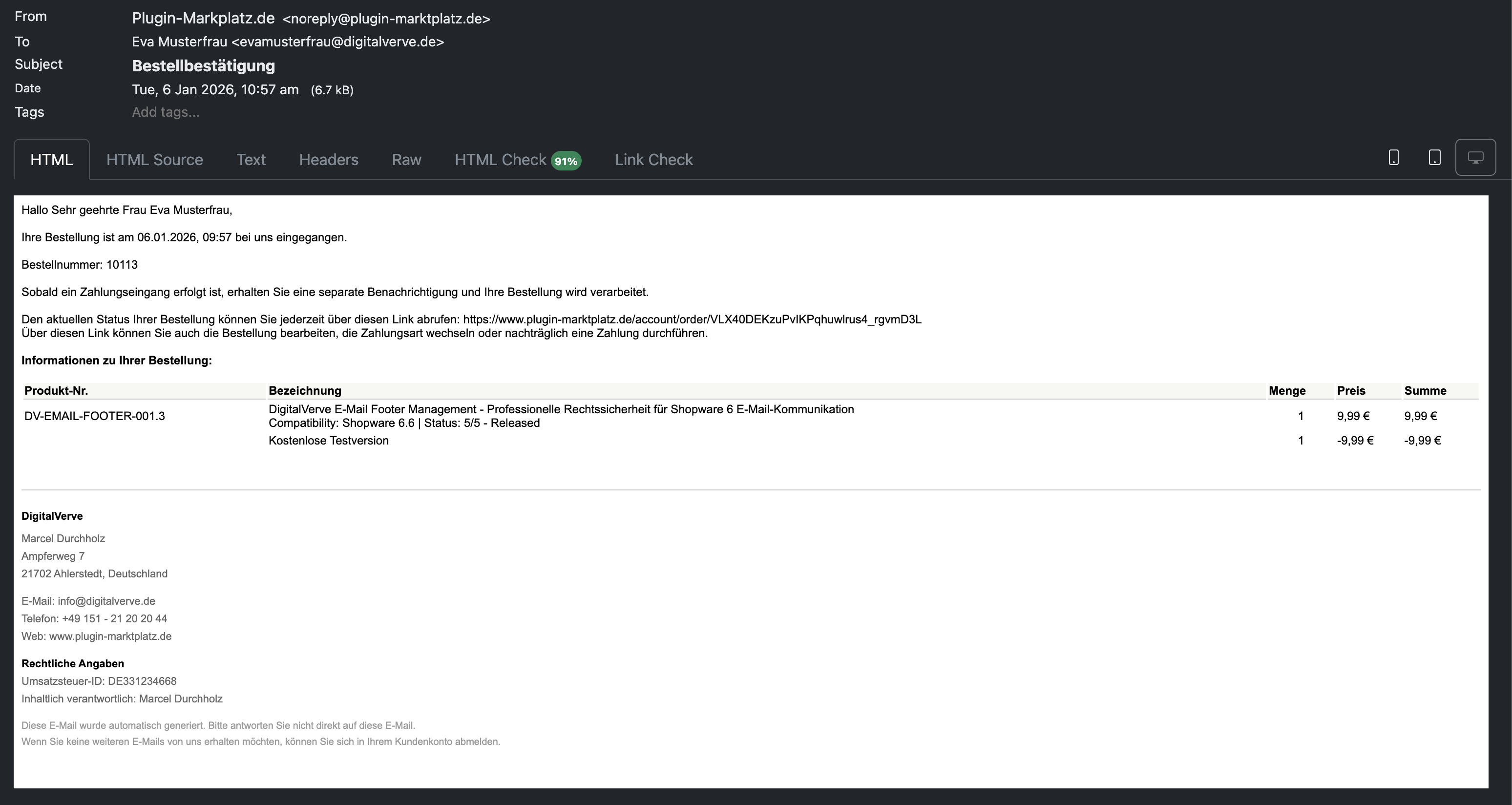
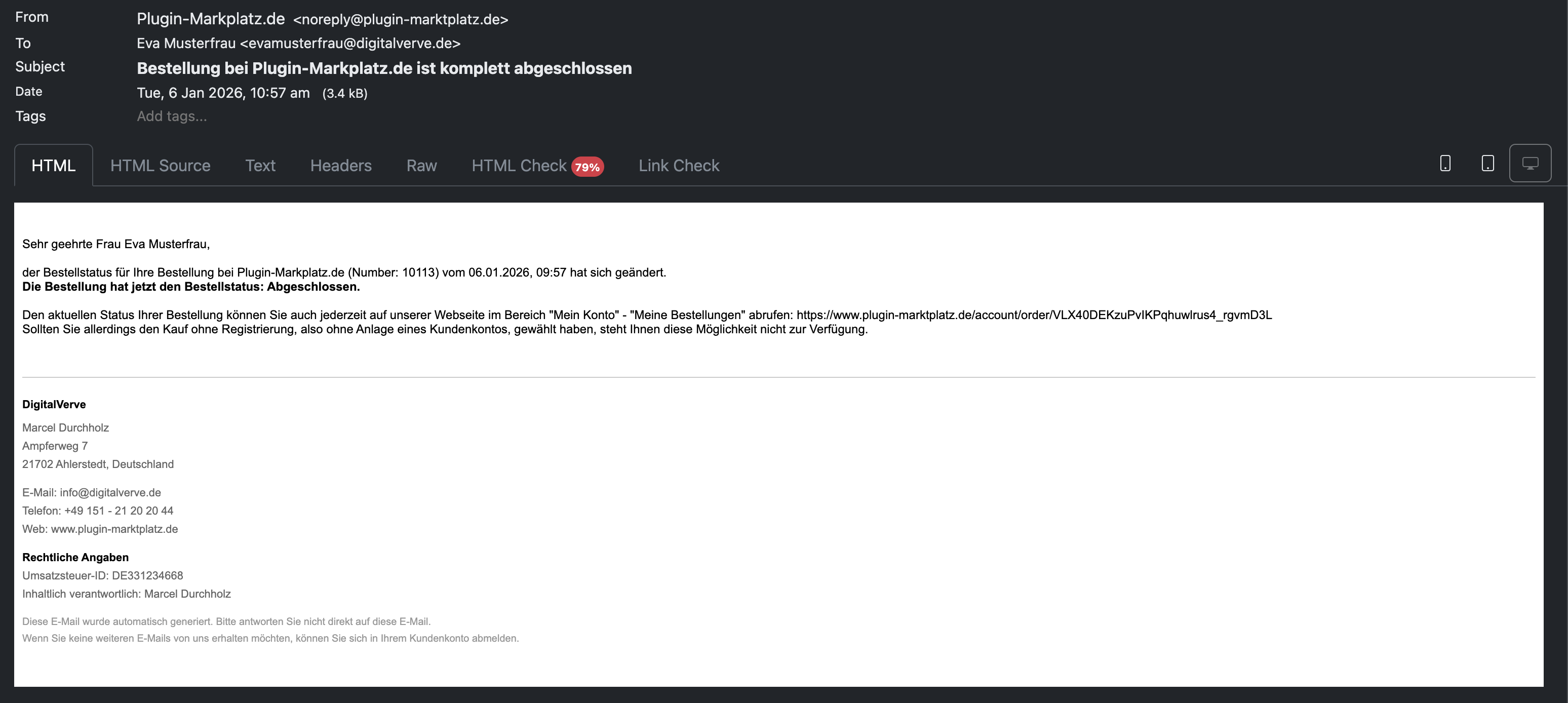
The DigitalVerve Email Footer Management plugin revolutionizes how online shops handle legal compliance in email communications. By implementing a sophisticated event-driven architecture, the plugin seamlessly intercepts all outgoing emails—from order confirmations and shipping notifications to password resets and customer communications—automatically appending a professionally formatted footer containing your essential business information.
Unlike traditional approaches that require modifying individual email templates, this plugin operates at the system level through Shopware's MailBeforeSentEvent system. This means you configure your footer information once, and it automatically appears in every email sent by your shop, regardless of the email type or template used. The intelligent injection system identifies the optimal position for footer placement, inserting content before the closing body tag for perfect formatting every time.
Comprehensive Configuration Management
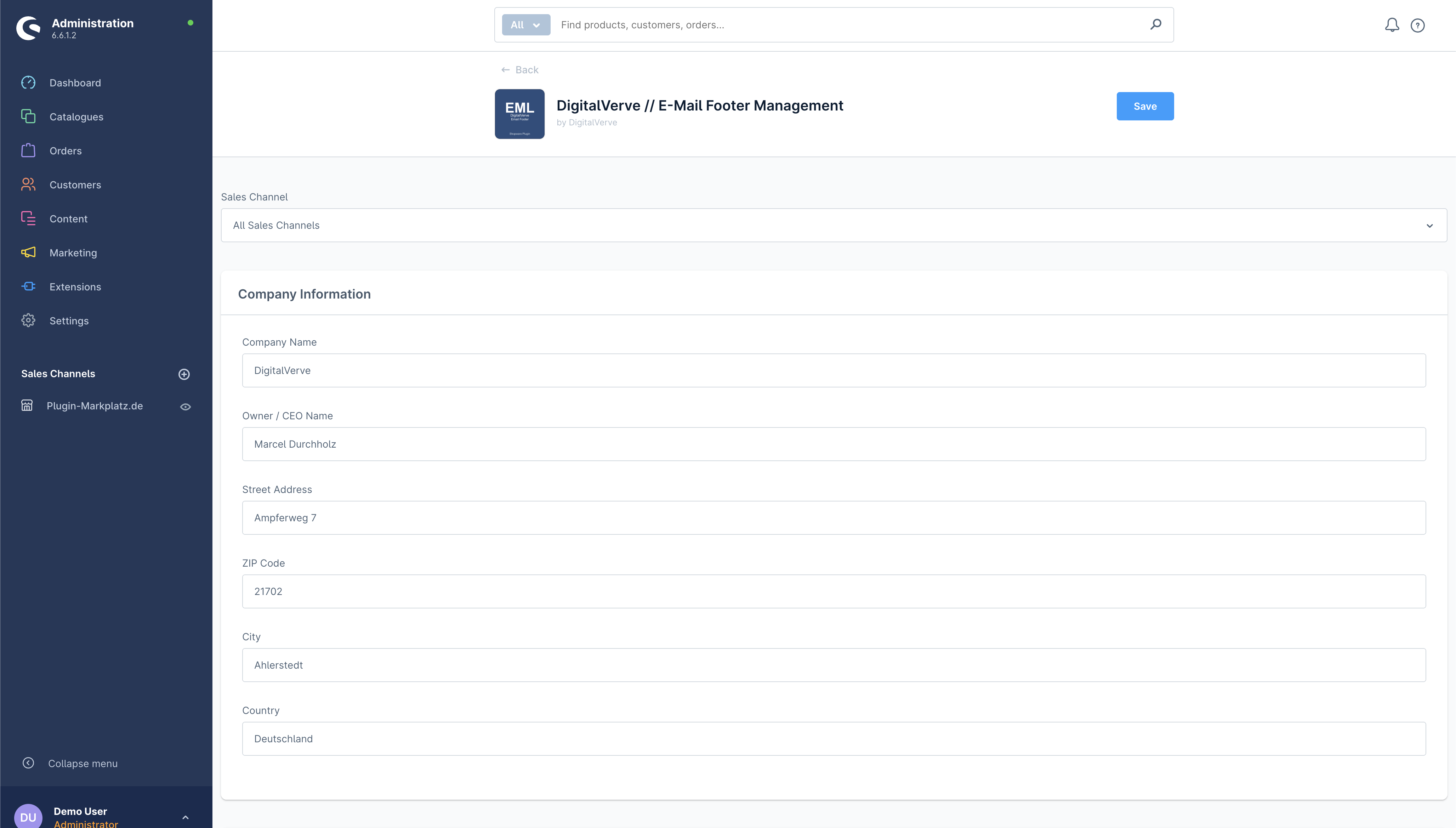
The plugin provides an intuitive admin interface organized into four logical sections, making it easy for shop administrators to manage all aspects of their email footer content:
Company Information Section allows you to maintain your complete business identity including company name, owner or CEO name, full street address, ZIP code, city, and country. Each field is optional and intelligently displayed—if you don't fill a field, it simply won't appear in the footer, ensuring a clean presentation.
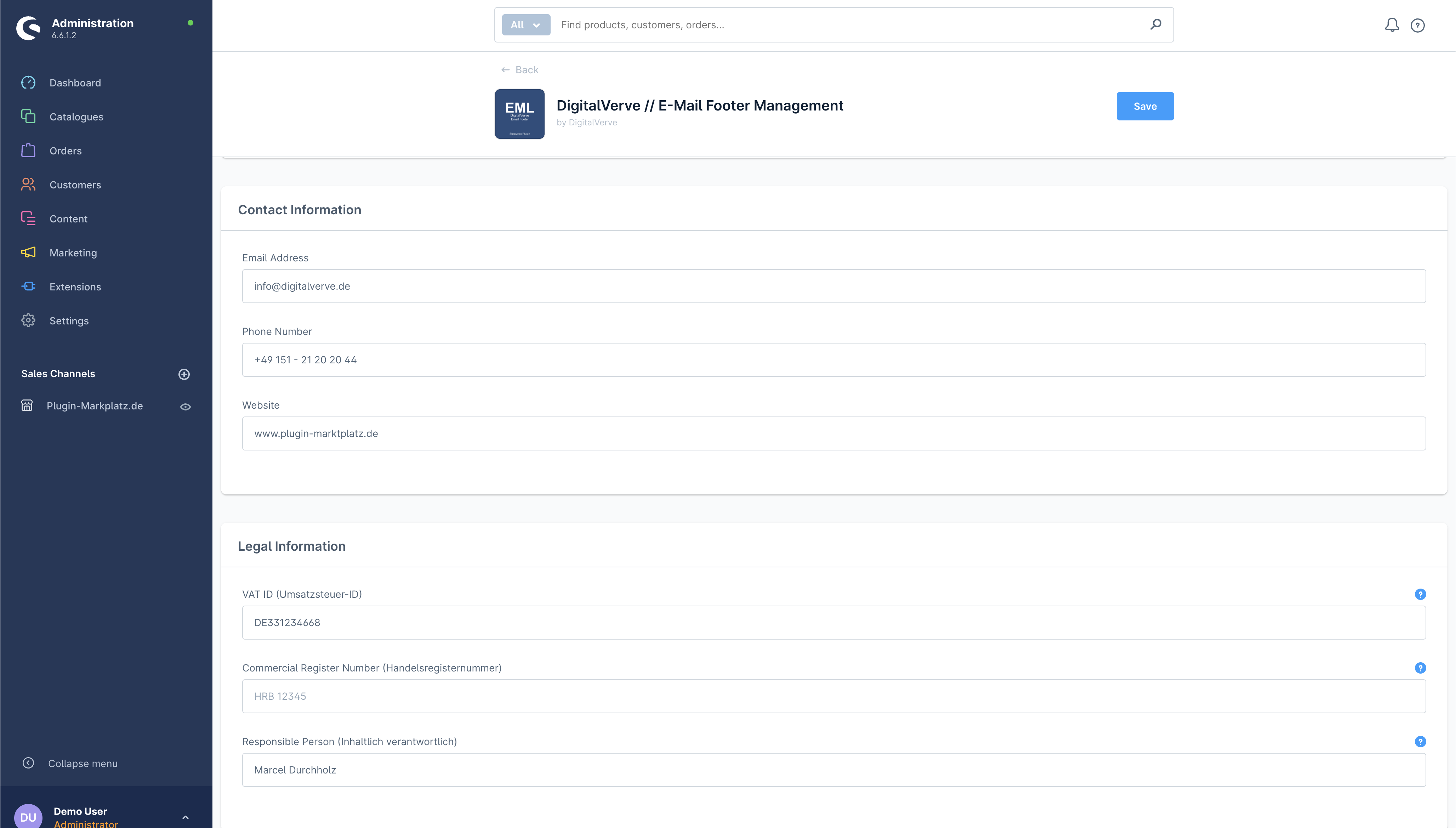
Contact Information Management centralizes your communication channels with dedicated fields for email address, phone number, and website URL. The system automatically formats these fields with appropriate labels in the recipient's language, creating a professional contact block that enhances customer trust and accessibility.
Legal Information Compliance addresses the critical requirements of e-commerce operations with fields for VAT ID (Umsatzsteuer-ID), optional commercial register number (Handelsregisternummer), and the responsible person designation according to § 55 Abs. 2 RStV. The plugin understands that not all businesses require every field—for instance, the commercial register number only displays when provided, perfect for businesses that aren't required to have one.
Footer Settings Control provides granular control over footer behavior with options to enable or disable the entire footer system, show auto-generated email notices, display unsubscribe information, and add custom legal text or disclaimers. This flexibility ensures the footer meets your specific business requirements while maintaining professional standards.
Intelligent Field Display System
One of the plugin's standout features is its intelligent field display logic. Rather than showing empty fields or placeholder text, the system only displays information you've actually configured. This smart approach ensures your email footers always look professional and complete, never showing unnecessary blank lines or missing data indicators.
The rendering engine evaluates each configured field and builds the footer dynamically. For example, if you provide a commercial register number, it appears with the appropriate label. If you don't need this field, it's simply omitted from the footer entirely. This conditional rendering extends to all optional fields, creating a tailored footer that perfectly matches your business structure.
Multi-Language Support Excellence
Understanding that modern e-commerce operates in a global marketplace, the plugin includes sophisticated multi-language capabilities. The system automatically detects the recipient's language preference and adjusts footer labels accordingly. German customers see "E-Mail" and "Telefon" while English-speaking customers see "Email" and "Phone"—all without any additional configuration required.
The translation system extends beyond simple labels to include legal notices and disclaimer texts. Auto-generated email notices and unsubscribe information automatically appear in the appropriate language, ensuring clear communication with all customers regardless of their language preference.
Sales Channel Aware Architecture
For merchants operating multiple sales channels, the plugin offers sales channel-specific configuration capabilities. This means you can maintain different footer information for different brands, regions, or business units all within a single Shopware installation. Each sales channel can have its own company details, legal information, and contact data, ensuring accurate information delivery based on the customer's shopping context.
Professional Footer Design Standards
Every footer generated by the plugin follows professional design standards that ensure compatibility with all email clients while maintaining visual appeal. The footer features a clean separation from email body content with a subtle border, uses web-safe fonts for universal compatibility, implements proper spacing and typography hierarchy, and maintains consistent styling across all email types.
The HTML structure is carefully crafted with inline CSS styling to ensure consistent rendering across different email clients, from modern web-based interfaces to legacy desktop applications. Color choices emphasize readability with darker text for important information and subtle gray tones for supplementary content.
Advanced Technical Implementation
Built on Shopware 6's modern architecture, the plugin leverages several advanced technical concepts to deliver reliable performance. The event subscriber pattern ensures zero impact on email sending performance, while the service-oriented architecture promotes maintainability and extensibility. Context-aware rendering adapts to different email scenarios automatically, and the translation integration provides seamless multi-language support.
The FooterRenderer service handles all aspects of HTML generation, including proper escaping of user input for security, conditional field rendering based on configuration, language-aware label generation, and optimal HTML structure for email compatibility. This separation of concerns ensures the plugin remains performant even when processing high volumes of emails.
Security and Compliance Features
Security is paramount when handling business information in automated systems. The plugin implements comprehensive security measures including automatic HTML escaping to prevent XSS attacks, secure configuration storage in Shopware's system config, protection against email injection attempts, and compliance with data protection requirements.
For businesses operating under GDPR and other privacy regulations, the plugin supports compliance through optional unsubscribe information display, clear identification of automated communications, and centralized management of legal disclaimers. These features help ensure your email communications meet regulatory requirements while maintaining professional standards.
Seamless Integration Process
Implementing the plugin requires no technical expertise or template modifications. After installation through Shopware's standard plugin system, administrators simply navigate to the plugin configuration, enter their business information, save the settings, and the footer immediately begins appearing in all outgoing emails. The entire process typically takes less than five minutes, transforming your email compliance stance instantly.
Performance Optimized Design
Despite its comprehensive functionality, the plugin maintains exceptional performance characteristics. The footer rendering process is highly optimized, adding negligible overhead to email sending operations. Caching mechanisms ensure configuration values are retrieved efficiently, and the event-driven architecture means the plugin only activates when emails are actually being sent.
Customization and Extensibility
While the plugin works perfectly out-of-the-box, it also provides extensive customization options. The custom legal text field allows businesses to add specific disclaimers, terms, or notices unique to their operations. The flexible enable/disable toggles let you control exactly which supplementary information appears, adapting the footer to your specific needs.
Future-Proof Architecture
Designed with longevity in mind, the plugin follows Shopware 6 best practices and coding standards. Compatibility with Shopware versions 6.4 through 6.6 demonstrates the forward-thinking approach to development. The clean service architecture and proper use of Shopware's plugin system ensure the solution will continue functioning reliably as your shop grows and evolves.
Professional Support and Maintenance
As a DigitalVerve product, the Email Footer Management plugin comes with professional support and regular updates. Our team continuously monitors Shopware developments to ensure ongoing compatibility and can provide assistance with configuration, customization, or integration challenges.
Business Benefits Summary
Implementing the DigitalVerve Email Footer Management plugin delivers immediate business value through centralized legal information management, consistent brand presentation across all emails, reduced risk of non-compliance with legal requirements, time savings from automated footer injection, and professional appearance in all customer communications. The solution transforms a typically manual and error-prone process into an automated, reliable system that enhances both compliance and professionalism.
Perfect for e-commerce businesses of all sizes seeking to professionalize their email communications, ensure legal compliance, and maintain consistent brand standards across all customer touchpoints. Whether you're a single-brand shop or a multi-channel enterprise, this plugin provides the tools needed to manage email footer information efficiently and effectively.