
DigitalVerve Hide Update Messages - Advanced Update Notification Management for Shopware 6

€9.99*
DigitalVerve Hide Update Messages - Professional Update Notification Management for Shopware 6
The Hide Update Messages plugin gives you complete control over update notifications in your Shopware 6 administration. With this sophisticated solution, you can hide distracting update notices and create a focused work environment for your team. The plugin operates with an intelligent master switch system that allows you to control all update-related elements with a single click, while individual settings remain available for granular adjustments.
The multi-layered implementation of the plugin combines various technologies for maximum effectiveness. It uses API interception to modify update responses, frontend JavaScript for dynamic hiding of UI elements, and CSS rules for permanent visual adjustments. This combination ensures that update notifications are reliably hidden at all levels of the administration without affecting Shopware's core functionality.
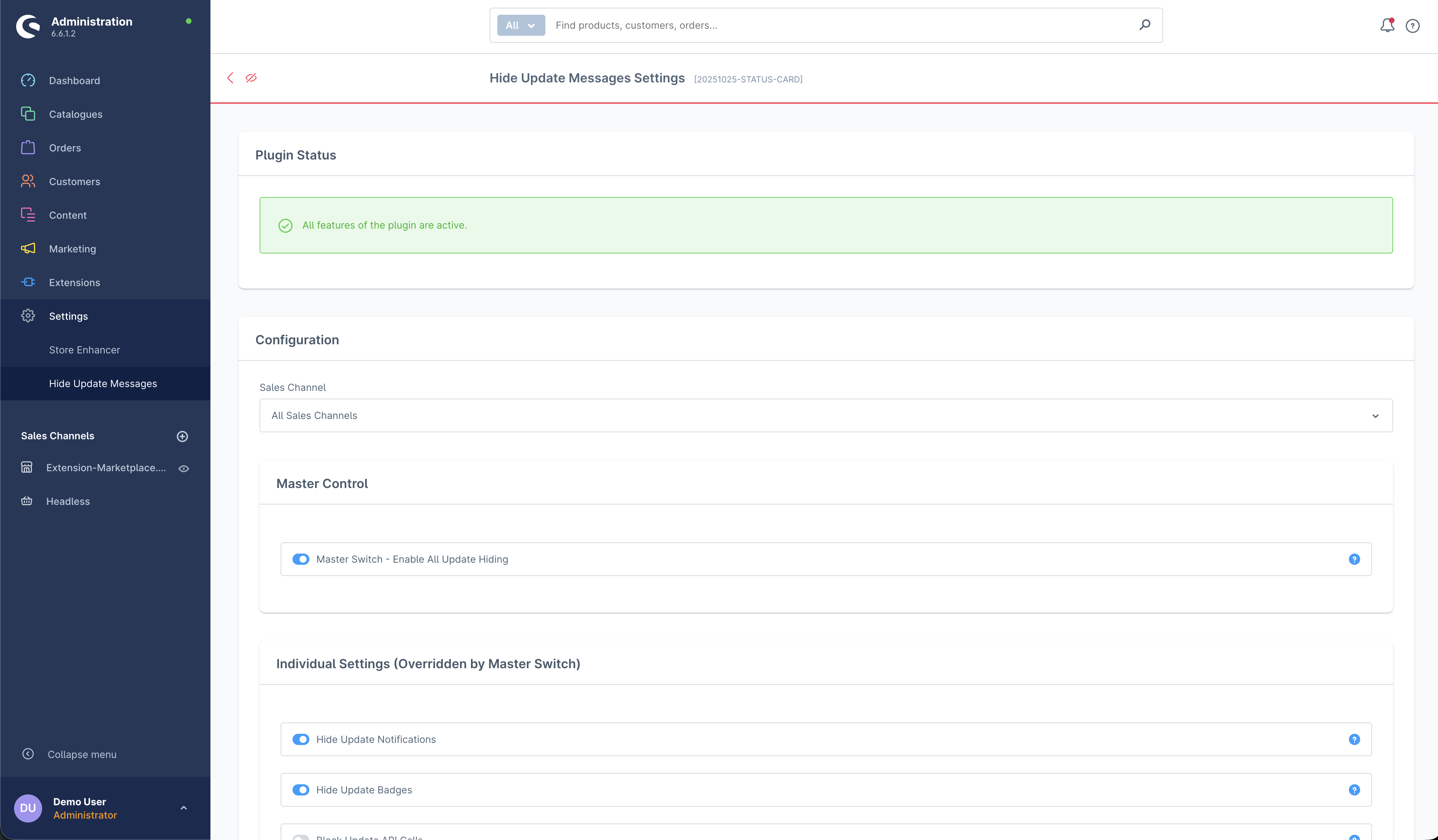
The master switch concept makes management particularly user-friendly. A central master switch overrides all individual settings and allows you to activate or deactivate all update hiding with one click. Below this, you'll find three separate configuration options: hiding update notifications, concealing update badges, and optionally blocking update API calls for maximum control.
The plugin's intelligent notification filtering distinguishes between different types of system notifications. While update-related messages are reliably hidden, important success notifications and other critical system messages remain visible. The plugin uses sophisticated keyword detection that identifies update messages in both German and English, targeting only these for hiding.
The dynamic element detection uses a MutationObserver to capture update elements that load after the initial page render. This is particularly important as Shopware loads many UI elements asynchronously. The plugin continuously monitors the DOM and applies its hiding rules to new elements as they appear. Additionally, a periodic check every three seconds ensures that no update hints slip through.
The API interception functionality offers the deepest level of control. When activated, the plugin can intercept and modify update-related API calls. This prevents update information from reaching the interface in the first place. However, this option should be used judiciously as it can affect normal update checking functionality.
The integrated tracking system allows DigitalVerve to collect anonymized usage data to continuously improve plugin quality. Tracking includes plugin events such as installation and activation, as well as basic system information. This feature is enabled by default but can be disabled in the settings if you prefer not to share data.
Hide Update Messages is the ideal solution for shop operators and agencies who prefer a controlled admin environment. Whether you want to temporarily hide update notifications to focus on important tasks or centrally manage update administration - this plugin provides the necessary flexibility. The clean, non-invasive implementation ensures that your Shopware installation remains unchanged and you can return to standard update display at any time.